Per photo, per pack, and per pixel — eight vendors’ own pricing pages, and one empty room measured five times.
ByQian, founder of DoVirtualStaging··Prices read November 12, 2026; files measured November 13, 2026
The short answer
Virtual staging — furniture added inside a photo of an empty room — costs $0.20 to $1.50 per photo in packs bought once, $0.24 to $2.67 per photo under a monthly quota, and $23 to $24 per image when a person edits it. Prices read from eight vendors’ own pages on November 12, 2026.
Cheapest way to start: $9 for six photos, no subscription.
Cheapest rate at volume: $0.20 per photo, at $69 for 350.
Why the spread: the billing model, not the output. Over 100× at the extremes.
$0.20
AI, one-time pack at 350 photos
$0.24–2.67
AI, monthly quota at full use
$23–24
Human editor per image
$1,500
Physical staging NAR median, per home
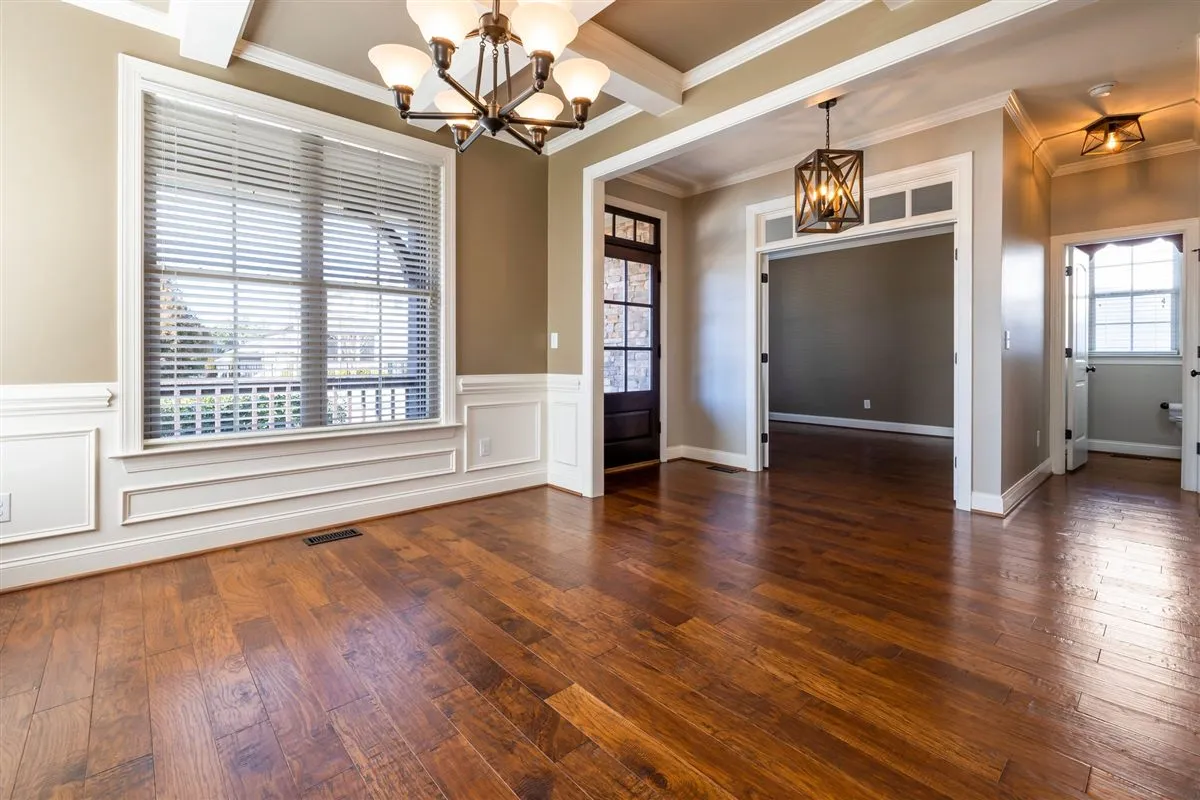
Before
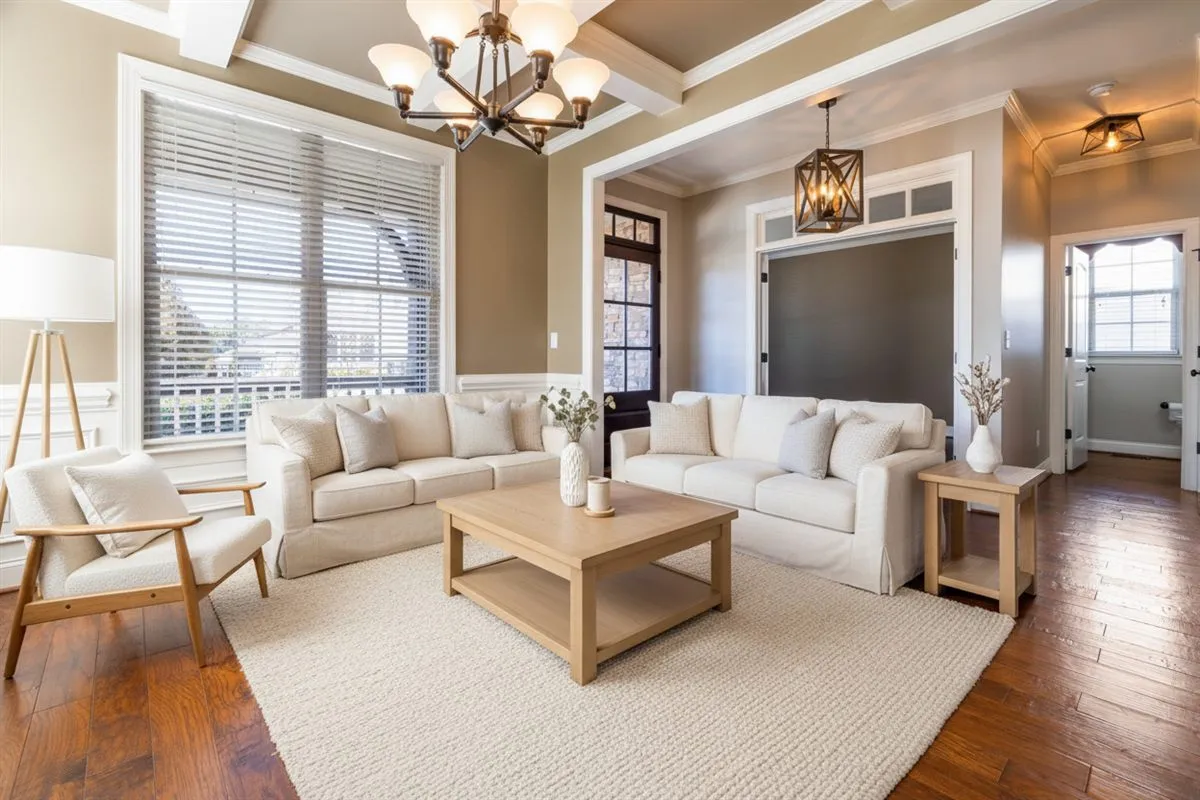
After
One empty room, 1200×800, both files downloaded from the tools compared below. The staged version cost $1.50 — the $9 pack of six, no subscription. Physical staging of the same home runs a NAR median of $1,500.
Every way to buy it, in four rows
Virtual staging cost by billing model: price per photo, cash needed for a first six-photo listing, and what each model commits you to.
Method
Per photo
First 6 photos
What it commits you to
One-time pack
$0.20–$1.50
$9
Cash up front. Credits do not expire.
Monthly quota
$0.24–$2.67
$16–$19
A year, at the yearly price. Unused quota resets every month.
Human editor
$23–$24
$138–$144
One invoice per image. A revision is another image.
Physical staging
Not sold per photo
$1,500
Furniture rental, delivery, insurance, removal.
One-time pack
$0.20–$1.50
Cash up front. Credits do not expire.
Your first 6 photos: $9
Monthly quota
$0.24–$2.67
A year, at the yearly price. Unused quota resets every month.
Your first 6 photos: $16–$19
Human editor
$23–$24
One invoice per image. A revision is another image.
Your first 6 photos: $138–$144
Physical staging
Not sold per photo
Furniture rental, delivery, insurance, removal.
Your first 6 photos: $1,500
Read the last column first. Three of these sell you a photo; the fourth is the thing the photo replaces. The spread is not a discount — it is four different commitments, and only the pack carries its value past the month, because unused credits stay in the account. Packs are priced per photo because that is what you buy. A subscription is priced per month, so $16 to $19 is its cheapest tier and whatever you do not use that month is gone. Physical staging is a quote per home, not a rate; $1,500 is the NAR median, and the same room in a different market lands somewhere else.
I did this with a credit card, a folder of screenshots, and one empty room. Same 36-megapixel photo, uploaded to five tools, downloaded at whatever the free or cheapest tier hands you. Then I opened every file and wrote down the pixels and the bytes.
The same room came back at $9, at $16, and at $24. Nothing changed except the thing being sold to me: photos I now own, a month of quota, or one designer’s afternoon. The files ranged from 102 KB to 3.8 MB.
So there is no single number that fits every listing, and every page that hands you one is quoting its own product. This one quotes eight. One of them is mine, and it loses in here — twice, in places I point at when they happen. If you are still on the basic question, what virtual staging is and what you get is written up separately. If you would rather put your own listing count in than read my fixed table, the calculator further down works out your bill against a subscription — including the volumes where the subscription is the cheaper buy. It also runs as a standalone page, the virtual staging cost calculator.
One cost that does not show up on any pricing page: the disclosure label. Every board asks for one somewhere, and the label position differs by board — a text field at CRMLS, a watermark at ARMLS. It is included in the $9 here, not sold as an add-on.
Full disclosure: this site sells one of the products in these tables. It is not the cheapest per photo at the entry tier, and its file is among the smallest in the file table. Both are argued below, not buried.
How I checked
One photo: a free stock interior, 7,360 × 4,912 — 36 megapixels, 2.1 MB. Five uploads, identical bytes every time, so any difference downstream came from the tool and not from what I fed it.
No re-rolls: default style, first option, whatever the tool put in front of me. I did not sit there regenerating until something looked good, because you will not either.
The file each tool gave me for free, or at its cheapest paid tier. That is the thing a customer sees before deciding whether to pay.
What this does not measure: who produces the best image on average. One room in one style cannot tell you that, and anyone claiming otherwise from a sample this small is selling you something.
Watch instead
The same eight prices, in one video
The same teardown as this page, cut to three minutes fifty-two: eight vendors, one empty room, the gap between the advertised rate and the real bill, and the four costs that never make it onto a pricing page. Every figure still has a table below, and the tables are the version that gets updated.
Nothing is requested from YouTube until you press play, and the player runs in its no-cookie mode. Watch on YouTube↗.
What are the three types of virtual staging pricing?
These three are not really competing. They are three ways of charging for the same hour of work, and which price you pay depends on which door you walked through.
$23 – $24 per image
A person opens your file in Photoshop
BoxBrownie is $24. Styldod is $23, down to $16 at eight images or more. You are buying a designer’s judgement, one finished image at a time — so a second style is a second image on the invoice, not a toggle.
I went through BoxBrownie’s order form and ticked nothing. The total came to $24. It does not move. It also does not include most of what makes a staged photo usable for a listing, which is two sections down and the reason I took a screenshot.
$0.24 – $2.67 per photo
A month of quota
Virtual Staging AI, VirtualStaging.AI, Collov AI, AI HomeDesign. The bottom of that range is the top tier on a yearly commitment. The tier you actually sign up for is $0.32 to $2.67, and whatever you do not generate is gone at the end of the month.
The tell is always the same. VirtualStaging.AI’s homepage says “as low as $0.32 per image”. Its first tier is $25 for twenty photos, which is $1.25. The $0.32 lives at the 1,000-photo tier. One click separates the headline from the till, and it is a 3.9× gap.
$0.20 – $1.50 per photo
Photos you own
This site, StageHQ, VirtuallyStage. No renewal, no reset, nothing to cancel. The expensive part is the doorway — $1.50, $0.95 and $4.38 for the first pack — and the cheap rate only shows up once you buy a pack you will finish. That sentence is the whole argument of this page, so hold on to it.
Why does the advertised rate differ from the price you pay?
Sorted by the number they advertise. Read across to the last column and the smallest decimal turns into the largest bill.
Per-photo figures are the smallest purchase divided by the photos inside it. Subscription rates use the yearly-billing monthly price — monthly billing is worse, not better. Packs appear once because they do not renew. VirtualStaging.AI at its $49 tier is $0.98; same vendor as the $1.25 row, different tier.
A rate per photo means nothing until you know what the file is
Nobody publishes this, so I measured it. Same source photo, the download each tool actually handed me:
Free-tier downloads in this table are watermarked. The watermark is not what makes them small. Pixels and byte counts read from the files themselves, November 13, 2026.
The 4K row is the only one here that is not a default download — it is the second entry in the same menu, one export per photo every 24 hours, no credit and no render used. It was weighed on three of our own exports rather than the test photo above: the pixel count is deterministic (four times the render), the byte count is not. Read it as print size, not as recovered detail.
One tool handed me my own photo back. I uploaded 7,360 × 4,912 and VirtualStaging.AI returned 7,360 × 4,912 at 3.83 MB — same frame, nothing thrown away, and a higher bits-per-pixel ratio than the file I sent it (0.49 up to 0.87). I cannot tell from the file whether it repainted at full size or resampled and re-encoded, and for your decision it does not matter: it is the only standard download in this table you could put on a print board without enlarging it first. Every other default download in that table threw away between 88% and 97% of the pixels before it reached me — and an upsample, ours included, does not put those pixels back.
131 KB scared me. Then I did the division. Collov AI’s “1080P” download is 1,264 × 844. 131 KB across 1.07 megapixels is about one bit per pixel — a perfectly ordinary JPEG, not a squashed one. It is a small picture, not a damaged one. Ours is 1,248 × 832 at 102 to 159 KB, which is 0.81 to 1.25 bits per pixel: same league, a fifth of the area. Stop reading megabytes. Read the pixel count.
(“Full size” means whatever they say it means.) StageHQ sells 4K as a separate credit, and its default “full size” download is 2,496 × 1,664 — 4.15 megapixels, about a ninth of what I uploaded, sitting under a button that says full size. Ours sells the same idea without the credit: 4,992 × 3,328, one per photo per day, included. What neither label means is a fresh 36-megapixel render — ours is that 1,248 × 832 interpolated four times, and here it is free.
Where we sit, plainly: the default file is among the smallest in that table, and until this month that was the end of the argument. It is not any more. 4,992 × 3,328 closes the print gap at no extra charge, one export per photo every 24 hours, and it is still an upsample of a 1,248 × 832 render. If what the job needs is true 36-megapixel detail, pay someone who keeps it — that is a different purchase and no per-photo arithmetic gets you there.
One listing, six photos, three invoices
This is the comparison people actually make, and it is not about quality — all three put furniture into an empty room. It is about what happens to the money you did not use. Which, at two listings a month, you will not.
A human editor
Subscription, entry tier
The $9 pack here
Paid today
$138 – $144
$16 (inside a $192 year)
$9
What you get
6 finished images
6 photos for this month
6 photos, no expiry
A second style, same room
A second image on the invoice
Another credit from the quota
Included — up to 8 renders in 24 hours
When the month ends
Nothing
Unused quota is gone
Nothing to cancel
If you only stage 4 of the 6
Still $138 – $144
$16, and 2 photos are forfeited
$9, and 2 photos wait in the account
Subscription column uses Virtual Staging AI’s $16 entry tier on yearly billing; Collov AI and AI HomeDesign start at $19, VirtualStaging.AI at $25. The editor column uses BoxBrownie’s $24 and Styldod’s $23 per image, before any add-ons.
The base price is a ticket. The boxes are the bill.
I opened a BoxBrownie order, selected nothing, and the total said $24. That is not a trick — $24 is the listed price for one image and it stays $24. The trick is what happens when you tick the things that make the photo usable. Every one of them is a separate line.
Run it on a six-photo listing. Rush delivery alone is $12 an image — $72 on the set, on top of $138 to $144, to get the pictures a day sooner. None of this is hidden. It is all on the same page as the base price. It is just not in the number anyone compares.
I stopped ticking at that point and looked at the running total mostly out of curiosity about how bad it could get. Styldod had already asked for my name and contact details before it would show me a price at all, which is the other half of the same problem: you cannot find out what it costs without becoming a lead first.
Same story one tier up on the subscription side: the room types and styles I wanted were behind an upgrade on Collov AI, and the file without a watermark was behind one on Virtual Staging AI. The entry plan buys a demonstration of the product.
I paid extra for a feature that deleted the ceiling
On AI HomeDesign I ticked sky replacement. The photo was an indoor living room. The system read the ceiling as sky and gave me a sunset, so the room came back open to the weather. Everyone who saw it laughed, me included. It was also the most useful thing I learned all afternoon: the paid extras are exactly where the accidents happen, because they are the ones rewriting pixels nobody asked them to touch.
Before you pay for sky, dusk, lights-on or object removal, check that you can get the original back. Ours sells none of those, which is one reason it cannot make that mistake — and also why, if your photo needs them, we are the wrong purchase.
The quiet year: two listings, twelve photos
Most agents stage a handful of listings a year, not a handful a month. At that volume the advertised rate stops meaning anything:
Subscription, $16 tier
$192 a year
Buys 72 photos across twelve months. Use 12 and the photos you actually received cost you $16 each — six times the $2.67 the same tier advertises, and worse than any option on this page.
Packs, no renewal
$18 – $19 a year
Two $9 packs cover the twelve photos at $1.50 each, or one $19 pack of 30 covers them at $0.63 each and leaves 18 photos sitting in the account with no expiry date.
The gap between those two cards is $173 to $174, and it buys the same twelve images. It is $173 if you take the single $19 pack, $174 if you take two $9 packs — which is what the calculator below picks, because it is the cheaper of the two. A subscription prices your month. A pack prices your photos.
Put your own numbers in
The two cards above assume two listings and six photos each. Change them and the bill recalculates against one-time packs, your subscription, and a human editor — including the volumes where the subscription is genuinely the cheaper buy.
1 to 24 properties
3 to 15 rooms
That is 12 photos in total. We charge you for the photos you need, not a whole year up front.
Human editor
$3,000
$1,500 per home, NAR median
Collov AI
$19
1 month × $19
DoVirtualStaging, one-time
$18
Starter ×2
Here, one-time packs save you $1.
12 photos with Collov AI would cost $19 — 1 month × $19. We cover the same 12 with Starter ×2 — and the unused credits are still there next year.
Across 1–1500 photos a year, our packs never cost more than Collov AI at this tier. At the top end our 350-photo pack works out to $0.20 per photo, below what this plan reaches at its entry tier.
What it costs to get in, and what it costs to reach the good rate
Two numbers decide whether a tool fits you: the least cash you have to hand over, and how much you must buy to reach its best rate. Vendors put both on their page and quote one.
At the entry purchase, three vendors beat us per photo: Collov AI at $0.32, AI HomeDesign at $0.63, StageHQ at $0.95. Our $9 pack is still the smallest amount of cash anyone in that table asks for. At the top of each ladder we are the cheapest — $0.20 for $69 — and every other rate under $0.25 in this table needs $588 a year or more.
Two of these names differ by three characters and belong to different companies. Virtual Staging AI is the Zillow-owned app. VirtualStaging.AI is tied to the human staging shop VirtualStaging.com. I signed up for the wrong one first. Check which pricing page you are reading before you assume a rate belongs to the product you bought.
The only rate that matters is the one you divide yourself
Everything you paid in a year, divided by the photos you actually downloaded. Not the photos in the pack. Not the quota on the plan. The files you used.
Three ways the same $69 pack lands differently
Use all 350 photos → $0.20 each.
Use 100 photos → $0.69 each, still below StageHQ’s $0.95 entry pack.
Use 50 photos → $1.38 each — better than the $9 pack’s $1.50, but you spent $60 more to get there.
This is why “buy the biggest pack” is bad advice at low volume, including from us. Buy the tier you will finish. If you stage two listings a year, that is $9 or $19, and the 74% saving on the $39 pack is money you would never collect.
Four costs that are not on the pricing page
A second style is a second invoice when a person is doing it
Per-image editing bills per finished image, so asking for the same room in two styles is two images on the invoice, not a setting you toggle. Here, changing the style is one of the eight renders included in the 24-hour window for that photo.
Removing furniture is a different purchase
We furnish empty rooms. If the room is already full and the pieces have to go, you need removal — Virtual Staging AI, Collov AI, AI HomeDesign and StageHQ all sell it — and nothing on this page covers that price.
4K is included; the detail inside it was never in the price
The Download button hands you 1,248 × 832. The second entry in the same menu is 4K — 4,992 × 3,328 on a 3:2 photo, one per photo every 24 hours, no credit and no render used — so the print-size objection costs nothing here. What it cannot do is put back what the render threw away: those 16.6 megapixels are the same image interpolated four times. If the job needs true 36-megapixel detail, that invoice is still with someone else.
Turnaround is a term you have to go find
Suppliers set their own and most bury it on the pricing page. Read it before you buy. If it is not stated, treat it as unknown — not as fast.
None of these are hidden on purpose by everyone — they are just not part of the number being compared. A second style you had to buy, plus one delivery that came back wrong, can quietly double the advertised rate.
Check the price against your own photo
All the arithmetic above is about billing models. It says nothing about whether the output is good enough for your listing, and that is the part to look at before you spend anything. One free preview on your own photo, no account. If the result holds up, $9 buys six more and they never expire. If it does not, all five tools in this article are one upload away, and three of them will hand you a better file than we will.
Checked November 12, 2026. One-time packs run $0.20 to $1.50 a photo. Monthly subscriptions bill $0.24 to $2.67 on yearly billing. A human editing service charges $23 to $24 per finished image. The $0.20 is our 350-photo pack; the $24 is BoxBrownie's base, before you tick anything.
Why does a subscription advertise $0.24 per photo when I pay $2.67?+
Because the rate belongs to the top tier, not the one you sign up for. Collov AI's $0.24 needs the $127 tier — $1,524 a year. AI HomeDesign's needs $49 a month. Virtual Staging AI's $0.53 needs $79 a month. At the tier you would actually pick, those three are $0.32, $0.63 and $2.67, and whatever you do not use resets at the end of the month.
I downloaded a 1080P file and it was only 131 KB. Is that a bad file?+
No. It is a small picture. I measured Collov AI's 1080P download at 1,264 × 844 and 131 KB, which is about one bit per pixel — an ordinary JPEG, not a crushed one. Ours is 1,248 × 832 at 102 to 159 KB. The pixel count is the number that matters. The megabytes mostly tell you how big the canvas was.
Can I download a 4K file?+
Yes — it is the second entry in the download menu, not the default. On a 3:2 photo it comes out 4,992 × 3,328, one export per photo every 24 hours, and it neither spends a credit nor counts against the eight renders. Three of our own exports weighed 4.0 to 5.4 MB as JPEG. Take it as print resolution: it is an upsample of the 1,248 × 832 render, so those pixels are interpolated, not recovered.
Is the biggest pack always the cheapest option?+
Only if you finish it. Divide what you paid by the photos you used, not the photos in the pack. A $69 pack of 350 is $0.20 each at full use, but use 50 and it is $1.38 — still below the $1.50 of the six-photo pack, though you have spent $60 more to get there. Buy the tier you expect to use up.
What exactly does $9 buy?+
Six photos, no expiry. Each one can be re-rendered in any style up to eight times inside 24 hours of the first render. You download the render you approved, without a watermark, at 1,248 × 832 — or at 4,992 × 3,328 from the 4K export in the same menu, which uses no credit and no render. A commercial licence, an optional MLS disclosure label you can reword, and a disclosure record are included.
Do virtual staging credits expire?+
Here, no — same for StageHQ and VirtuallyStage. VirtualStaging.AI rolls unused credits over for three months on paid tiers. AI HomeDesign rolls unused photos over on yearly plans. Virtual Staging AI and Collov AI reset them at the end of each billing month.
Are Virtual Staging AI and VirtualStaging.AI the same company?+
No, and I registered for the wrong one first. Virtual Staging AI (virtualstagingai.app) is the Zillow-owned product — $16 a month for six photos. VirtualStaging.AI (virtualstaging.ai) is a separate company tied to the human staging shop VirtualStaging.com, and it charges $25 for twenty. Same category, three characters apart, two different price tags on the invoice you were not reading carefully.
How much does it cost to stage a whole listing?+
Six photos is the usual listing set. That is $9 here, $16 to $19 for one month on a subscription entry tier, or $138 to $144 with a human editing service. Our $19 pack of 30 makes it $0.63 a photo if you stage five listings in a month.
Is virtual staging cheaper than physically staging the house?+
A physical quote bundles furniture rental, delivery, insurance and removal, and those swing too much between markets for me to put an honest number on here. Put your own quote next to $9 per six-photo listing, or next to the $138 to $144 an editing service charges for the same six images.
Does the price include removing furniture that is already in the photo?+
Not here. We furnish empty rooms, and a furnished room comes back re-furnished rather than cleared. If removal is what the listing needs, Virtual Staging AI, Collov AI, AI HomeDesign and StageHQ include it.
Every figure was read from the vendor’s public pricing page on November 12, 2026, and every file size was measured from a download completed on November 13, 2026. Both will change. Re-check before you buy. See also our terms and acceptable use policy.
Sources
Every price on this page was read off the vendor’s own pricing page on November 12, 2026. Nothing here is quoted from a review site, a rate card, or an affiliate round-up — if a number changes, it changes at the address below first.
Writing about staging costs? Take the sentence below, or link the table. Every price was read off eight vendor pages on November 12, 2026 and every file size came from a download completed on November 13, 2026 — measured, not estimated from a rate card.
Virtual staging in 2026 runs $23–$24 per image when a person edits it, $0.24–$2.67 per photo under a monthly quota, and $0.20–$1.50 per photo for packs bought once. The spread is over 100× at the extremes, and it comes from the billing model, not from the output.
The one figure that is on nobody’s pricing page: the same 36-megapixel room came back as 102 KB from one tool and 3.8 MB from another. Thirty-seven times the file, across a sixteen-fold spread in what the photo cost. If you need a number that no vendor will hand you, use that one.