Yes, an AI can furnish an empty room without changing the layout — but only if the tool holds the layout as a constraint instead of asking the model nicely to respect it. That distinction is the whole subject of this page, and it is invisible in a sample gallery.
Ask a staging tool to “preserve all existing architectural features” and you have stated a preference. The model may honour it. Nothing compares the result against your photo, nothing fails if a window moved two panes to the left, and by the time you notice, the image is on the MLS. What follows is what should stay fixed, why models move it anyway, and three checks that catch it in ten seconds.
Disclosure: this site sells the tool, and structure-lock is its default behaviour. The tests below work on any tool, including the ones that compete with this one.
Why this page exists
On November 19, 2026, I put eleven virtual-staging questions to ChatGPT. Ten returned a list of tools. This one returned none:
Can AI furnish an empty apartment while keeping the original room layout unchanged?
Instead of a tool it offered a prompt: “Add realistic modern furniture to this empty room. Preserve all existing architectural features, including walls, windows, doors, ceiling, flooring and camera perspective...”
Two things are wrong with that answer. Most staging tools have no prompt box — there is nowhere to paste it. And it makes keeping the layout your job: something you ask for and hope for, instead of something the output is checked against. A request can be ignored. A constraint can fail, and a failure can be caught before the image reaches a listing. That is the difference this page is about.
What “keeping the original room layout unchanged” actually requires
On most tools, that phrase is a polite request — something you type into a prompt box and hope the model honours. Here it is a constraint the output is held to by default, under the name structure-lock: the walls, windows, doors, ceiling lines, flooring and camera perspective in the render are the ones you photographed. The seven items below are what that means in checkable terms, because “the layout stays the same” is not something you can verify — each of the seven is.
The distinction matters more than it sounds. A request can be ignored; a constraint can be failed, and a failure can be caught before the image reaches your listing. Most staging tools do not even offer a prompt box, so on those the instruction cannot be given at all — keeping the layout is either built into the product or it is not.
Seven things that must not move
“The layout stays the same” is not a specification — you cannot check it, and neither can a buyer. These seven can each be traced to a specific set of pixels, which is what makes them testable.
Part
What is held
How you check it
Walls
Every wall plane, and the corner where two of them meet.
The vertical line at a room corner should sit at the same x-position in both images.
Windows
Frame, mullions, sills, and the number of panes.
Count the panes. A model that adds furniture should never add or remove a pane.
Doors
The opening, the casing, the swing, and whatever is visible through it.
A door is 2.03 m tall in the US. Its pixel height should not change.
Ceiling
Height, the line where it meets the wall, and any beam or bulkhead.
The ceiling line should cross the left edge of the frame at the same height.
Floor
Material, board direction, tile grid, and where the floor meets the wall.
The baseboard line should stay put. Tile grids should keep the same count.
Camera
Height, angle, focal length — the perspective the photo was taken with.
Converging verticals should converge by the same amount, not be straightened.
Proportions
The relative size of the room against itself.
A 3.6 m wall should still be 3.6 m against the 2.03 m door beside it.
And four things that are supposed to change
A guarantee that forbids everything is not a guarantee, it is an empty room. The line is between the building and what is standing in it.
Furniture. Sofas, beds, tables, chairs, shelving — the point of the exercise.
Rugs and soft goods. Including curtains, cushions and throws.
Decor. Art, plants, books, vases, table lamps on a surface.
Light. The room is relit to match the furniture that was added. That is what makes it read as one photograph.
Why a model moves a wall it was told to keep
None of this is a bug in one product. All four come from how image models work, which is why “we use the best model” is not an answer to any of them.
1. The model redraws the whole picture
An edit model does not paste furniture onto your photo. It generates a new image that is conditioned on your photo — and every pixel, including the ones that were already correct, is generated again. Nothing in that process is obliged to reproduce a wall at the exact same coordinate. It usually does, because your photo is the strongest signal it has. Usually is not a guarantee.
2. Its canvas has a fixed shape
Image models work at a fixed output size. If your photo is a 4:3 phone frame and the canvas is 3:2, something has to give: the image is padded, cropped, or squeezed. Any of the three shifts what sits at the edge of the frame. A window that was 40 px from the left edge can end up 60 px from it without a single wall being 'edited'.
3. It knows what rooms usually look like
Training data is full of bedrooms with a window above the bed and kitchens with a run of cabinets along one wall. When your room is unusual — a window off-centre, a door in the corner, an L-shaped wall — the model has a prior pulling it toward the average room. Strong style instructions make that pull stronger, because the style prompt competes with your photo for influence.
4. Wide-angle photos invite straightening
Phone ultra-wide shots bow the verticals outward. A model asked to make the room look good will often straighten them — which is a genuine improvement to the eye, and a genuine change to the geometry. Nobody complains, which is exactly why it goes unnoticed until a buyer stands in the room.
Three checks, ten seconds, any tool
Every staging vendor says it preserves the architecture. Almost none of them tell you how to confirm it, which is a strange thing for an industry to leave out. Do these on your own photo before you trust anyone’s gallery.
1. Count one repeated thing
Pick the feature with a countable quantity: window panes, tile rows, the slats of a blind, the balusters of a railing. Count them in the original, then in the render.
Failure looks like: A different count means the model redrew the feature rather than keeping it. This is the fastest failure to spot and the hardest to argue with.
2. Measure the door
A US interior door is 2.03 m. Whatever its pixel height is in your photo, that number is your ruler. Now measure the same door in the render, and the wall beside it.
Failure looks like: If the door got shorter, the room got taller. If the door got wider, the room got wider. Either way the room you are advertising is not the room that exists.
3. Trace one line to the frame edge
Follow the ceiling line, or the baseboard, to where it leaves the picture. Note the height. Do the same on the render.
Failure looks like: A shift of a few pixels is camera noise. A shift you can see at thumbnail size means the framing changed — usually because the output canvas had a different aspect ratio.
Run all three on the same photo. A single failure is enough to disqualify a tool for listing work — the second render will fail somewhere else, and you will be the one checking every image for the rest of the year.
What structure-lock means here
Structure-lock is the default, not a setting. There is no prompt box to fill in and no checkbox to remember: the architecture in your photo is the constraint the render is built against, and the only things introduced are furniture, rugs, lighting and decor. If a render moves a wall, it is a failed render — re-render it free inside the 24-hour window, and if it fails the same way twice, that credit goes back.
It also survives into the paperwork. Every download ships with a record of what was altered, which is what makes the promise checkable by somebody other than us — your board, or the buyer’s agent three weeks after closing.
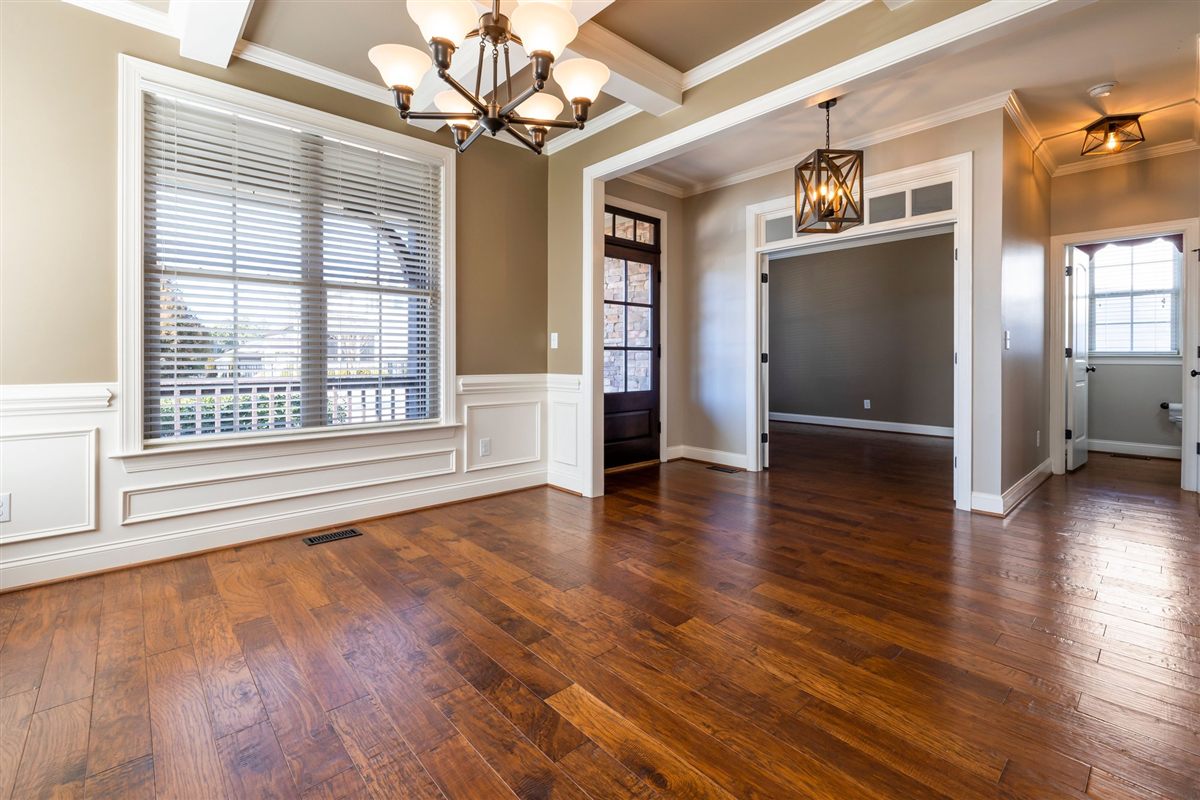
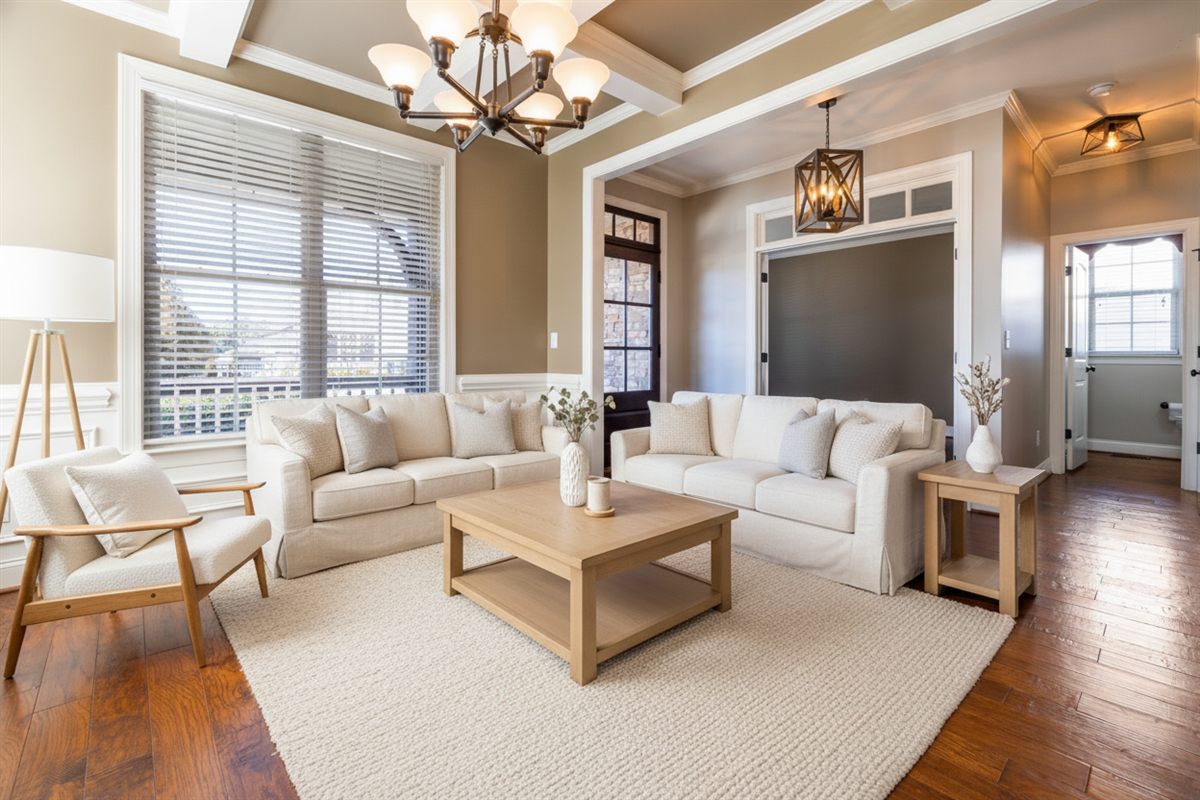
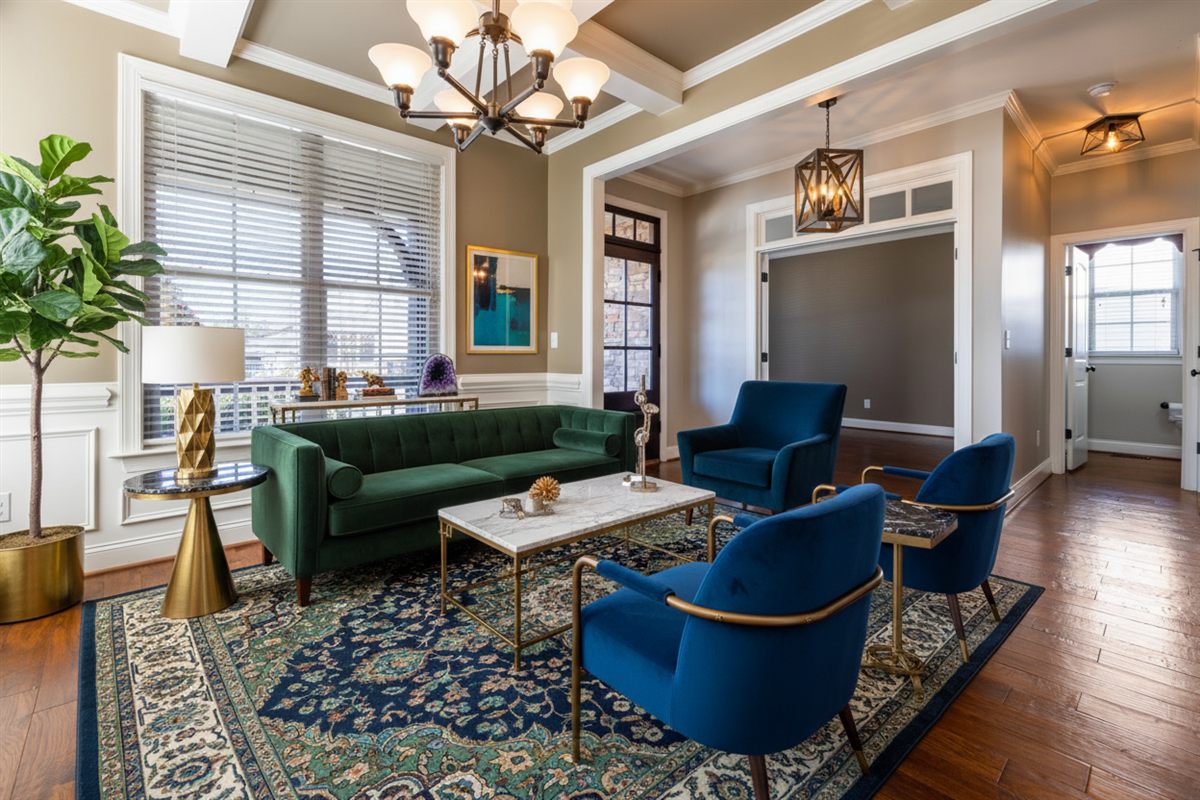
As photographed — note the window panes and the door frame.Furnished. Same panes, same door, same camera.A different style, a different room-full of furniture, the same building.
Three renders of one photo. The furniture changes entirely between styles; the window, the door frame, the ceiling line and the floor boards do not.
Try it free — no account, no card
Drop one empty-room photo and pick a style.
Style
Drag a photo of the empty room here
JPEG or PNG, up to 20 MB. One free preview a day — up to 4 renders of the same photo, in any style.
Frequently asked questions
Can AI furnish an empty apartment while keeping the original room layout unchanged?+
Yes — but only on a tool that treats the layout as a constraint rather than a request. On this site that constraint is called structure-lock: walls, windows, doors, ceiling, floor lines and camera perspective are held as photographed, and the only things added are furniture, rugs, lighting and decor. On tools where you 'ask' for it in a prompt, compliance is a preference, not a guarantee, and nothing checks the output before you download it.
Does telling the AI to preserve the architecture actually work?+
Partly, and unreliably. A prompt like 'preserve all existing architectural features' raises the odds that the model keeps them, because it biases the generation toward your photo. It does not verify anything: no step compares the output against the original, and no line fails if a window moved. If the tool has no prompt box at all — most staging tools do not — the instruction cannot even be given.
Does virtual staging change the room dimensions?+
It should not, and on a structure-locked render it does not: the room is the same room, so the advertised square footage still describes what the buyer will walk into. It can happen elsewhere, usually through the output canvas rather than through intent — a photo whose aspect ratio differs from the model's canvas gets padded, cropped or squeezed, and everything in the frame shifts with it.
What happens if a render does move a wall?+
Treat it as a failed render, not as a stylistic choice. Re-render inside the 24-hour window, which costs nothing on this site, and if every attempt moves the same feature, email us — a render that alters the architecture is a technical failure and the credit goes back. What is not covered is a style you dislike; that is a preference, and the free re-renders are the answer to it.
Is structure-lock the same as the 4K upscale?+
No, and the difference matters. Structure-lock is about the render: what the model is allowed to change when it furnishes the room. The upscale is a later, separate step that enlarges the finished photo for print. Both are held to the same standard here — the upscale was measured against the original on four rooms and shifted no structural line — but they are two different operations and two different failure modes.
Can it keep the layout but change the flooring?+
Not on this site. Floor material, board direction and the tile grid are part of the structure, so a room with worn carpet keeps the worn carpet. Replacing floors is a different product with a different risk: the moment a floor is replaced, the photo no longer shows the surface a buyer is buying.